
OpenCourant Run and Postprocess: a small Windows desktop app that runs anOpenCourant deck pair and shows the resulting .vtk files with PyVista, embedded in the same window.
Install
Download OpenCourantRP-Setup-<version>.exe from theReleases pageand run it (Windows 64-bit). The wizard lets you choose the install folder (per-user by default, or all users if you accept the admin prompt) and optionally creates a desktop shortcut. The OpenCourant solver is included, so no Python and no separate solver install are needed. Uninstall from Windows Settings > Apps.
To run the code instead of the installer, see Run from source below.
Features
- Run an OpenCourant deck pair (
NAME_0000.rad/NAME_0001.rad), or a single combined deck (engine block first, starter from/BEGIN), with the bundled solver, with a live log. - Compressed results (
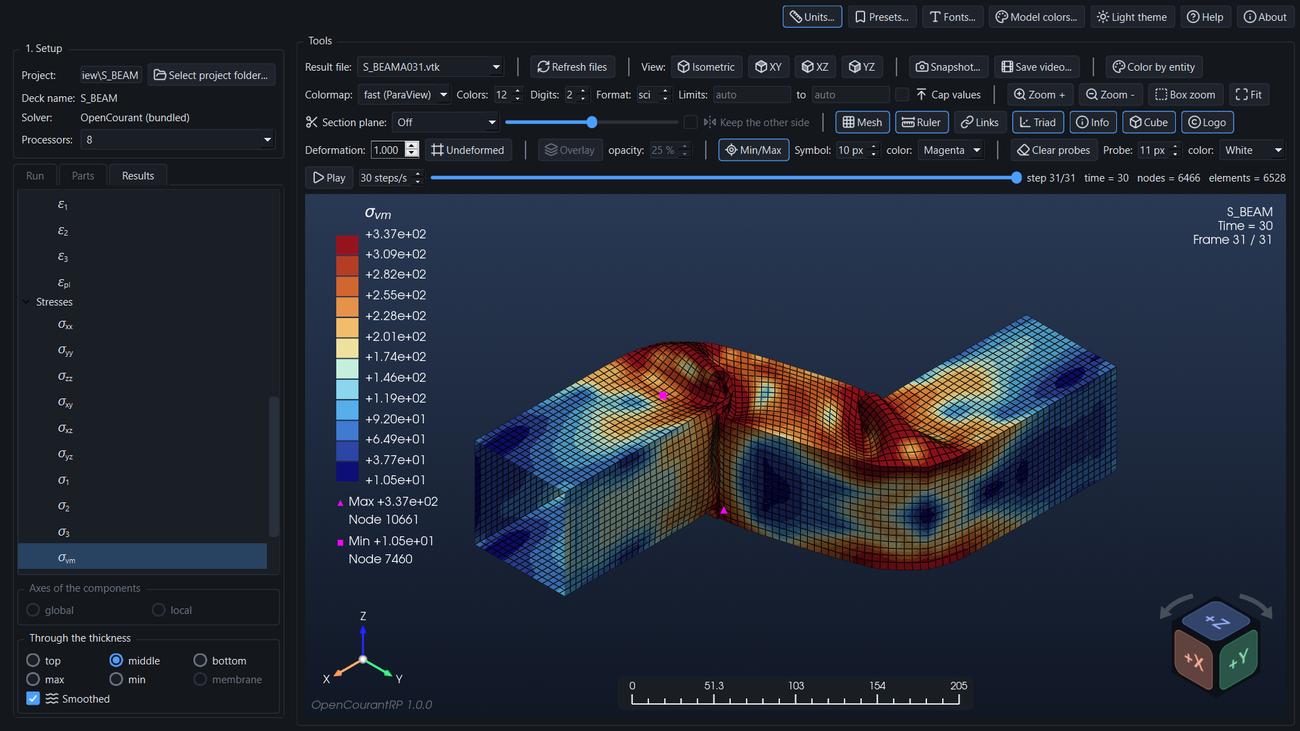
/ANIM/GZIP,NAMEA###.gz): kept in the run; the Results tab asks whether to decompress and convert All the time steps, Some (a file window that lists only the.gzfiles) or none, and it can ask again later (usually the last) to.vtk. - Results tab: a tree of every variable. Displacements, velocities and accelerations (Ux, Uy, Uz, U, Vx, Vy, Vz, V, Ax, Ay, Az, A), contact forces (Fx, Fy, Fz, F), strains (components, principal values, equivalent plastic strain) and stresses (components, principal values, von Mises, maximum shear), damage, temperature, specific energy, hourglass energy, pressure, density, element time step, nodal time step and added mass, with symbols and subscripts in the colour-bar title.
- Through the thickness (top, middle, bottom, max, min) for shell stresses and strains, and global or local axes for the tensor components (the solver writes them in the local axes of each element).
- Solid elements (hexahedra, tetrahedra, ...): the same stresses, strains, von Mises stress, specific energy and time step, one value per element in the global axes; models with shells and solids share one colour scale.
- Parts tab: show or hide each part of the model; the colour range follows the parts that are shown.
- Colour bar: colormap (coolwarm, vik, RdYlBu, RdBu, jet, turbo, inferno, ParaView fast), 2 to 24 colours, limits, caps for values out of range, min/max markers, deformation scale, an undeformed view and a translucent undeformed overlay with adjustable opacity.
- Probes (right click): the value at the nearest node, or inside the element for unsmoothed results.
- Model colors (background plain or gradient, triad, entities): a fixed color for rigid bodies, springs and rigid walls (they have no result), a Color by entity switch that paints shells, solids and the others each in its own color, and a color for the mesh edges; the background, the triad colors (and the sphere at its origin) and the look of the view cube can be changed too; presets keep them all.
- On-screen ruler that follows the zoom, model information (name, time, frame), a view cube (drag it to turn the model, click a face, edge or corner), an axes triad and a logo, each switched on and off by a button; optional units for the dimensions, times and the results, a choice of digits and format (sci/dec) for the color bar numbers, fonts for every text of the view, and presets that store a whole layout under a name.
- Zoom tools: Zoom +, Zoom -, box zoom (drag a rectangle) and Fit to the whole model, besides the mouse wheel.
- Snapshots to PNG, JPEG, TIFF or PDF with a quality multiplier, video to MP4 or GIF, view buttons (isometric, XY, XZ, YZ), Play, and a light and a dark theme.
- A Help button opens the manual (
docs/manual.md, also built as one dark-mode HTML page).
The full description of every control is in theuser manual.
Workflow
- Select project folder: the folder holding
NAME_0000.radandNAME_0001.rad. Both decks must share the sameNAME, otherwise the app reports an error. Existing.vtkresults load at once. - Run (the Run tab): the bundled solver is used; choose the number of processors first. Stop ends the whole run.
- Results: pick a time step (slider or file list) and a variable in the Results tab; hide parts in the Parts tab. The toolbar groups the controls by purpose: result file; view, animation and output; colour bar, display and zoom; section plane and the buttons Mesh, Ruler, Links, Triad, Info, Cube and Logo; deformation with the undeformed overlay, min/max and probes.
- Save a snapshot or a video, or keep the layout as a preset.
Run from source
For those who prefer to run the code instead of the installer. You need Windows 10/11 64-bit (the solver executables are Windows-only), Python 3.10 or newer (checked on clean installs with 3.10 and 3.14), and Git.
git clone https://github.com/CAMLAB-UChile/OpenCourantRP.git
cd OpenCourantRP
python -m venv .venv
.venv\Scripts\activate
pip install -e .                       # editable: the app looks for the solver in the checkout (see below)
python tools/fetch_solver.py           # downloads the official OpenCourant release into solver/ (about 480 MB)
opencourantrp                          # or: python -m opencourantrp
(In PowerShell activate with .venv\Scripts\Activate.ps1.)
- The solver. The app runs the solver from the
solver/folder at the root of the checkout, which is why the install must be editable (-e).python tools/fetch_solver.py --from C:\path\to\OpenCourantcopies it from a local copy instead of downloading. With a normalpip install .(not editable) the checkout is not found: set the environment variableOPENCOURANTRP_SOLVERto a folder that holdsexec\starter_win64.exeinstead. - Check the installation:
python -m opencourantrp.app --selftest result.txtwrites a short report (solver found, video encoders, math text) and exits with code 0 when everything is in place. - Tests:
pip install -e ".[dev]", thenpytest. - The manual. The Help button opens
src/opencourantrp/resources/manual.html, which is part of the repository; after editingdocs/manual.mdrunpip install markdownandpython tools/build_manual.py. - Update:
git pull, thenpip install -e .again ifpyproject.tomlchanged.
Build the installer
The solver is not stored in git (solver/ is git-ignored). After cloning, the build downloads the official release into solver/ automatically if it is missing (or run fetch_solver.py yourself, e.g. with --from to use a local copy). The installer needsInno Setup 6(winget install JRSoftware.InnoSetup).
python -m venv .venv
.venv\Scripts\pip install -e ".[dev]" pyinstaller
.venv\Scripts\python tools/build_installer.py     # -> dist\OpenCourantRP-Setup-<version>.exe
.venv\Scripts\pytest
tools/make_icon.py regenerates the application icon. tools/build_manual.py (needs pip install markdown) turnsdocs/manual.md into the dark-mode src/opencourantrp/resources/manual.html that the Help button opens; run it after editing the manual or its pictures in docs/img/.
tools/build_exe.py alone builds just the app folder dist\OpenCourantRP\. fetch_solver.py keeps only the double-precision SMP executables, the converters and the runtime libraries (about 480 MB) and verifies the SHA-256 when it downloads. OPENCOURANTRP_SOLVER can point to any other solver folder.
Contributing and support
OpenCourantRP is developed by a single maintainer and does not accept pull requests or issues on GitHub (both are turned off). You are welcome to fork the project under the terms of the AGPL-3.0-or-later license.
Comments, questions, bug reports and feature requests are welcome in theDiscussionssection. For a bug report, please include the OpenCourantRP version, the Windows version, the deck you ran and the log of the Run tab.
License
GNU AGPL v3, the same license as OpenCourant. SeeLICENSE. The solver itself is not part of the repository; it is embedded in the installer at build time.
Third-party
The line icons in src/opencourantrp/resources/icons/ are fromLucide(ISC license, see LICENSE-lucide.txt there).